
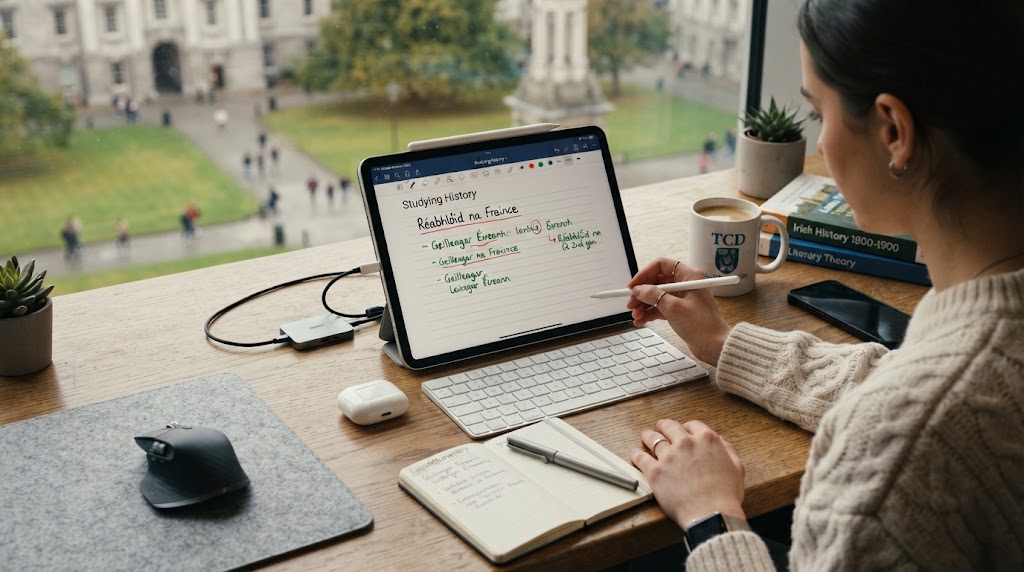
Best iPad Accessories for Students in Ireland in 2026
Author: SHAH ZAIB
Reviewed by: fonez4u2 Technical Team | Refurbished Smartphone & Tablet Specialists
Last Updated: October 2026
Reading Time: 12–15 minutes
An iPad can be an extremely useful study device, but the right accessories can make a much bigger difference than simply choosing a more expensive iPad model. For students, accessories should solve practical problems: taking handwritten notes, protecting the screen, typing assignments, attending online classes, charging safely, carrying the device between lectures and making long study sessions more comfortable.
The best setup is not necessarily the one with the most accessories. A student who mainly reads PDFs and watches lectures may only need a protective case, screen protector and reliable charger. Someone studying art or design may benefit much more from an Apple Pencil, while a student writing essays or completing business assignments may prefer a keyboard.
Apple itself groups iPad accessories into categories including Apple Pencil, keyboards, cases and protection, chargers and adapters, stands, headphones and content-creation accessories.
This guide explains the best iPad accessories for students in Ireland in 2026, what each accessory is useful for, which students actually need it, and how to avoid spending money on accessories you are unlikely to use.
Quick Answer: What Are the Best iPad Accessories for Students?
For most students, the best starting combination is a protective case, screen protector and reliable charger or charging cable.
If you take handwritten notes, annotate PDFs or draw, add an Apple Pencil. If you regularly write long assignments, a keyboard can make the iPad much more practical. A stand can also improve comfort during video lectures and desk-based study.
| iPad Accessory | Best For | Priority |
|---|---|---|
| Protective case | Everyday protection | Essential |
| Screen protector | Display protection | Highly recommended |
| Apple Pencil | Notes, PDFs and drawing | Recommended for many students |
| USB-C charger/cable | Reliable charging | Essential |
| Keyboard | Essays and productivity | Optional |
| iPad stand | Desk study and video lessons | Optional |
| AirPods/headphones | Lectures, calls and study | Optional |
| Pencil storage/case | Protecting Apple Pencil | Optional |
| Portable power solution | Travel and long days | Optional |
The important point is to match accessories to your course, study habits and iPad model, rather than buying everything at once.
Key Takeaways

-
A protective iPad case should be one of the first accessories a student buys.
-
A screen protector can provide an additional layer of protection against everyday scratches and marks.
-
An Apple Pencil is particularly useful for handwritten notes, diagrams, PDF annotation and creative subjects.
-
Always check Apple Pencil compatibility before purchasing because different iPad generations support different Pencil models.
-
A keyboard can be worthwhile for students who write essays, reports or long emails.
-
A reliable charger and compatible cable are more important than buying the cheapest charging accessory available.
-
Students who attend long lectures or study away from home may benefit from a stand or portable charging solution.
-
If buying a refurbished iPad, check the exact generation before purchasing accessories.
-
You do not need every accessory. Start with the items that solve your biggest everyday problems.
-
fonez4u2 offers iPads and related accessories, allowing students to build a setup around their particular requirements.
How We Choose the Best iPad Accessories for Students

A student accessory should do more than look good beside an iPad. It should provide genuine everyday value.
We consider five main factors.
1. Practical Use
The accessory should solve a real student problem.
For example, an Apple Pencil can be extremely useful for handwritten lecture notes, while a keyboard is more relevant to someone writing lengthy assignments.
2. Compatibility
Compatibility is critical.
An accessory may look suitable for an iPad but still be incompatible with a particular generation or model. This is especially important with Apple Pencil models, keyboard cases and some charging accessories.
3. Protection
Students regularly carry devices between home, college, libraries, cafés and other locations.
A good case can reduce the risk of everyday knocks and scratches, while a screen protector can add another layer of display protection.
4. Portability
The best student accessory is usually one that can be carried easily.
A bulky setup can become inconvenient if you are carrying an iPad, notebooks, textbooks and other equipment around campus.
5. Long-Term Value
A cheap accessory is not necessarily good value if it breaks quickly or does not work properly.
For chargers and electrical accessories in particular, safety and compatibility should take priority over simply choosing the lowest price.
Protective iPad Case: The First Accessory Most Students Should Buy

A protective case is arguably the most important iPad accessory for students.
Students often carry their iPad in backpacks and bags alongside books, chargers, pens and other equipment. The device may also be placed on desks, library tables and lecture-room surfaces throughout the day.
A case can help protect the iPad against everyday bumps, scratches and handling.
For students, a case with a practical design is usually more useful than a purely decorative option.
Look for:
-
A secure fit
-
Protection around the edges
-
Easy access to buttons and ports
-
A suitable camera cut-out
-
Reasonable grip
-
A stand or folding cover if useful
-
A design that does not add excessive bulk
fonez4u2 currently lists options such as the Black Book Case, which can be considered by students looking for a simple protective-cover format.
View the Black Book Case at fonez4u2
Before ordering any case, however, check the exact iPad model and generation.
A case designed for one iPad generation may not fit another model correctly, even when the screen size appears similar.
Screen Protector: Extra Protection for the Display

The iPad display is one of its most important components, so students should consider adding a screen protector.
A screen protector can help protect against everyday scratches, marks and minor contact with objects inside a bag.
This can be especially useful if you frequently carry your iPad between locations.
fonez4u2 has previously listed Full Clear Glass Protector and other glass-protection products in its accessories range.
View the Full Clear Glass Protector at fonez4u2
Should Students Use a Screen Protector With Apple Pencil?
For students using an Apple Pencil, the answer depends on how they use their iPad.
If your iPad spends most of its time on a desk, the additional protection may be less important than it is for a student who carries the device everywhere.
A good screen protector should also maintain comfortable touch interaction. If you use an Apple Pencil extensively, pay attention to how the protector affects writing feel and stylus responsiveness.
Apple Pencil: One of the Best iPad Accessories for Students

For many students, an Apple Pencil can transform the iPad from a tablet into a much more useful study tool.
It can be used for:
-
Handwritten lecture notes
-
PDF annotation
-
Diagrams
-
Mathematical working
-
Mind maps
-
Sketches
-
Highlighting
-
Document markup
-
Creative projects
Apple's current iPad accessory range includes different Apple Pencil options, so students should always check compatibility before buying.
fonez4u2 currently lists an Apple Pencil Pro C Type New product.
View the Apple Pencil Pro C Type New at fonez4u2
However, do not assume that this Pencil will work with every iPad.
The product listing identifies compatibility with specific newer iPad models, including iPad Pro M4, iPad Air M2/M3 and iPad mini A17 Pro.
That is exactly why students should identify their iPad model before purchasing a Pencil.
Is Apple Pencil Worth It for Students?
It can be particularly valuable if your course involves:
-
Mathematics
-
Engineering
-
Architecture
-
Medicine
-
Art and design
-
Education
-
Science
-
Business presentations
-
Extensive PDF reading
If you mainly type essays and use web-based applications, a keyboard may provide greater value than a Pencil.
iPad Keyboard: Best for Essays and Productivity
An iPad keyboard is one of the most useful accessories for students who regularly type.
Although the iPad's on-screen keyboard is perfectly suitable for short messages and occasional typing, a physical keyboard can be more comfortable for:
-
Essays
-
Reports
-
Assignments
-
Emails
-
Research notes
-
Presentations
-
Long-form documents
-
Online coursework
Apple includes keyboards among its main iPad accessory categories and offers keyboard options designed around different iPad models.
Who Should Buy an iPad Keyboard?
A keyboard makes the most sense if you frequently use your iPad as a laptop-style productivity device.
For example:
University student: Useful for essays and assignments.
Business student: Useful for reports, spreadsheets and presentations.
Teacher trainee: Useful for lesson planning and documentation.
Creative student: Useful if you combine writing with drawing or media work.
Casual learner: Probably unnecessary if you mainly watch lectures and read PDFs.
Do not buy a keyboard simply because it is marketed as a student accessory. Think about how much typing you actually do.
iPad Stand: A Small Accessory That Can Improve Study Comfort

A stand is often overlooked, but it can be useful for long study sessions.
You can use an iPad stand for:
-
Online lectures
-
Video calls
-
Watching educational videos
-
Reading
-
Following tutorials
-
Using an external keyboard
-
Cooking or practical learning demonstrations
A stand can also help position the iPad at a more comfortable viewing angle.
Apple's education accessory range includes display and stand options for iPad use.
For students who already have a keyboard, a separate stand can sometimes be a more flexible setup than buying a bulky keyboard case.
iPad Charger: Do Not Compromise on Charging Safety

A reliable charger should be considered an essential accessory.
Students depend heavily on their iPad for coursework, communication and online learning, so running out of battery at the wrong time can be frustrating.
More importantly, charger safety should never be ignored.
The Competition and Consumer Protection Commission (CCPC) advises Irish consumers to buy chargers from reputable retailers, check for the CE mark and ensure the charger is compatible with the device. It also warns against unsafe or poorly made chargers because they can create risks including electric shock and fire.
fonez4u2 currently lists an Apple USB-C 18W Power Adapter.
View the Apple USB-C 18W Power Adapter at fonez4u2
The exact charger you need depends on your iPad model and the charging connection it uses.
Do not choose a charger purely because it is inexpensive.
USB-C Cable: An Essential Student Accessory
A charging adapter is only useful when paired with a suitable cable.
USB-C has become increasingly important across Apple's modern device ecosystem, but students should still check the exact port on their iPad before ordering.
A suitable cable can be used for:
-
Charging
-
Data transfer
-
Connecting compatible accessories
-
Connecting some external devices
fonez4u2 lists Apple charging cables and adapters in its accessories range, including USB-C-related charging products.
Explore charging accessories at fonez4u2
When purchasing, check both ends of the cable.
For example, a USB-C-to-USB-C cable is different from a USB-C-to-Lightning cable.
Apple Pencil Case or Storage Solution

If you invest in an Apple Pencil, it makes sense to think about how you will carry and protect it.
Students frequently move between classrooms, libraries and home, which increases the chance of losing small accessories.
A Pencil storage solution can help keep the stylus with the iPad.
Consider:
-
A case with Pencil storage
-
A dedicated Pencil holder
-
A secure compartment in your laptop bag
-
A keyboard case with Pencil storage
This is not an essential purchase for every student, but it can be worthwhile if you use the Pencil every day.
AirPods or Headphones: Useful for Lectures and Study
Headphones can be particularly useful for students who watch online lectures, attend video meetings or study in shared environments.
They can help with:
-
Online classes
-
Recorded lectures
-
Language learning
-
Video tutorials
-
Calls
-
Music while studying
-
Podcasts
Apple's current iPad accessory range includes headphones and speakers alongside its other education-focused accessories.
fonez4u2 also lists AirPods among its Apple accessories.
View Apple AirPods 4 at fonez4u2
However, headphones should be treated as an optional accessory rather than a must-have iPad purchase.
If you normally study in a quiet room, you may not need them.
Best iPad Accessories for University Students

University students often need a balanced setup rather than a huge collection of accessories.
A practical university setup could include:
| Accessory | Why It Helps |
|---|---|
| Protective case | Protects the iPad during travel |
| Screen protector | Adds display protection |
| Apple Pencil | Notes and PDF annotation |
| Keyboard | Essays and assignments |
| Charger | Keeps the iPad ready for classes |
| USB-C cable | Charging and connectivity |
| Headphones | Lectures and calls |
| Stand | Desk-based study |
You do not need to buy everything immediately.
Start with the accessories that match your course and daily routine.
Best iPad Accessories for School Students

School students may have different priorities from university students.
For younger students, protection can be more important than advanced productivity accessories.
A practical setup may be:
-
Protective case
-
Screen protector
-
Reliable charger
-
Apple Pencil if required
-
Headphones if permitted and useful
A keyboard may not be necessary unless the student regularly types assignments.
For school use, durability and easy handling should generally take priority over creating a complicated workstation.
Best iPad Accessories for Students Studying Art and Design

Creative students can benefit significantly from an Apple Pencil.
An iPad can be useful for:
-
Sketching
-
Illustration
-
Design concepts
-
Handwritten ideas
-
Marking up designs
-
Digital artwork
-
Visual presentations
For these users, the Pencil may be more important than a keyboard.
A protective case also becomes important because creative students may carry their iPad between studios, classrooms and home.
The right combination could therefore be:
iPad + Apple Pencil + protective case + screen protection + charging setup.
Before buying the Pencil, always verify that your exact iPad supports the Pencil model you are considering.
Best iPad Accessories for Students Studying Medicine or Science

Students working with diagrams, textbooks, lecture slides and PDFs can benefit from a stylus.
An Apple Pencil can make it easier to annotate:
-
Lecture slides
-
Diagrams
-
Research papers
-
PDF textbooks
-
Charts
-
Study notes
A large amount of study material is now digital, so having a comfortable annotation method can make an iPad considerably more useful.
A screen protector may also be worthwhile if you use the iPad and Pencil extensively every day.
Best iPad Accessories for Students Studying Business
Business students may have different priorities.
If you spend a lot of time typing reports, presentations and emails, a keyboard may provide more value than an Apple Pencil.
A sensible setup could be:
-
Protective case
-
Keyboard
-
Charger
-
USB-C cable
-
Stand
-
Headphones
An Apple Pencil remains useful for diagrams, presentations and handwritten notes, but it may not be essential.
Best iPad Accessories for Students on a Budget

You do not need to spend a large amount of money to create a useful student iPad setup.
Start with the essentials.
Essential Budget Setup
1. Protective case
Protect the device you already own.
2. Screen protector
Add another layer of display protection.
3. Reliable charger
Make sure you can safely charge the iPad.
4. Suitable cable
Use a compatible cable rather than relying on an unknown low-quality option.
Add Later
Only consider a Pencil, keyboard, stand or headphones if your study habits justify them.
This approach prevents students from spending money on accessories that eventually remain unused in a drawer.
How to Choose Accessories for a Refurbished iPad

Buying a refurbished iPad can make an iPad setup more accessible, but accessory compatibility still needs attention.
The first step is to identify:
-
Exact iPad model
-
Generation
-
Screen size
-
Charging port
-
Apple Pencil compatibility
-
Keyboard compatibility
-
Case compatibility
For example, fonez4u2 currently lists both an Apple iPad 11th Generation and a Grade A Apple iPad 9th Generation, demonstrating why checking the exact model is important before buying a case or other model-specific accessory.
View the Apple iPad 11th Generation at fonez4u2
View the Grade A Apple iPad 9th Generation at fonez4u2
Do not assume that accessories for one generation will automatically fit another.
If you are still deciding which iPad to buy, read our Best iPad Models to Buy in Ireland in 2026 guide before choosing your accessories.
Do You Need an Apple Pencil and Keyboard Together?
Not necessarily.
These two accessories serve different purposes.
| Student Type | Apple Pencil | Keyboard |
|---|---|---|
| Art student | Excellent choice | Optional |
| Engineering student | Very useful | Useful |
| Medical student | Very useful | Useful |
| Business student | Optional | Excellent choice |
| Law student | Useful | Excellent choice |
| School student | Optional | Optional |
| Creative student | Excellent choice | Useful |
| Casual learner | Optional | Optional |
If you take handwritten notes but rarely type long documents, choose the Pencil.
If you spend hours writing assignments, choose the keyboard.
If you genuinely use both workflows, buying both can make sense.
Common Mistakes Students Make When Buying iPad Accessories

Buying the Wrong Case
The biggest mistake is choosing a case based only on screen size.
Always check the exact model and generation.
Buying an Incompatible Apple Pencil
Apple Pencil compatibility varies between iPad models.
Check before ordering.
Choosing the Cheapest Charger
Price should not be the only consideration.
The CCPC recommends buying chargers from reputable retailers, checking the CE mark and ensuring compatibility with your device.
Buying Too Many Accessories
You do not need a complete accessory collection.
Buy according to your actual study habits.
Ignoring Port Compatibility
Check whether your iPad uses USB-C or another connector before purchasing charging cables and adapters.
How to Build the Perfect Student iPad Setup
Instead of buying everything at once, build your setup in stages.
Stage 1: Protect the iPad
Start with:
-
Protective case
-
Screen protector
Stage 2: Keep It Powered
Add:
-
Suitable charger
-
Compatible cable
Stage 3: Improve Studying
Choose:
-
Apple Pencil for handwritten notes
-
Keyboard for long typing
Stage 4: Improve Comfort
Consider:
-
Stand
-
Headphones
-
Pencil storage
This approach makes it easier to control your budget.
Best iPad Accessory Combination by Student Type
| Student Type | Recommended Setup |
|---|---|
| School student | Case + screen protector + charger |
| University student | Case + screen protector + Pencil + charger |
| Law student | Case + keyboard + charger + Pencil |
| Business student | Case + keyboard + stand + charger |
| Medical student | Case + Pencil + screen protector + charger |
| Engineering student | Case + Pencil + keyboard + charger |
| Art/design student | Case + Pencil + screen protector + stand |
| Online learner | Case + stand + headphones + charger |
| Budget student | Case + screen protector + charger |
| Travelling student | Case + charger + cable + headphones |
There is no single setup that is perfect for everyone.
The best combination is the one that supports how you actually study.
How to Choose iPad Accessories Without Overspending
The easiest way to overspend is to buy accessories before deciding what you actually need.
Use this simple priority system:
Essential
Buy these first:
-
Protective case
-
Reliable charger
-
Suitable cable
Highly Recommended
Consider:
-
Screen protector
Based on Your Course
Choose:
-
Apple Pencil
-
Keyboard
Comfort Accessories
Consider:
-
Stand
-
Headphones
-
Pencil holder
This approach keeps your initial investment under control while still creating a useful study setup.
Why Compatibility Matters More Than Brand Name
A familiar brand name does not automatically make an accessory suitable for your iPad.
Compatibility should always come first.
For example, the iPad model determines whether a particular Apple Pencil is supported. Similarly, cases are usually designed around particular physical dimensions and camera or port layouts.
Before buying, record the following:
iPad model:
Generation:
Screen size:
Charging port:
Apple Pencil compatibility:
Keyboard compatibility:
Then compare accessories against those details.
This simple step can prevent many avoidable purchases.
Best iPad Accessories Available from fonez4u2

fonez4u2's current product range includes iPads and several accessories relevant to students.
Examples include:
-
Apple iPad 11th Generation
-
Apple iPad 9th Generation Grade A
-
Apple Pencil Pro C Type New
-
Apple USB-C 18W Power Adapter
-
Full Clear Glass Protector
-
Black Book Case
-
Apple AirPods 4
Explore iPad and Apple accessories at fonez4u2
Product availability can change, particularly for refurbished devices and individual variants, so students should check the current product page before ordering.
For example, the current fonez4u2 listing for the Apple iPad 11th Generation shows different storage and colour options, while the Grade A iPad 9th Generation listing also has its own configuration options.
Frequently Asked Questions
1. What is the most important iPad accessory for students?
A protective case is usually the most important accessory because students regularly carry their iPads between different locations. A reliable charger is equally important for keeping the device ready for study.
2. Is an Apple Pencil worth buying for students?
Yes, especially for students who take handwritten notes, annotate PDFs, draw diagrams or study creative subjects. It is less important if you mainly type assignments.
3. Do all iPads support Apple Pencil?
No. Apple Pencil compatibility depends on the specific iPad model and generation. Always check compatibility before purchasing.
4. Is a keyboard useful for university students?
A keyboard can be extremely useful for students who regularly write essays, reports, presentations and other long documents.
5. Do students need a screen protector?
It is not mandatory, but it can provide an additional layer of protection against everyday scratches and marks.
6. Should I buy a case and screen protector together?
For students who carry their iPad frequently, using both can provide more comprehensive everyday protection.
7. Is an iPad stand useful for studying?
Yes. A stand can improve viewing angles for lectures, video calls, reading and desk-based study.
8. Are AirPods necessary for students?
No. They are optional, but headphones can be useful for online lectures, calls, language learning and studying in shared environments.
9. What charger should I use with an iPad?
Use a charger that is compatible with your specific iPad and comes from a reputable source. The CCPC advises consumers to check charger safety, CE marking and device compatibility.
10. Can I use any USB-C cable with an iPad?
Do not assume that every cable provides identical functionality. Check the connector type and intended charging or data-transfer capabilities before purchasing.
11. Should I buy an Apple Pencil or keyboard first?
Choose based on your course. Pencil is generally more useful for handwritten notes and diagrams, while a keyboard is better for extensive typing.
12. What is the best iPad setup for a medical student?
A protective case, screen protector, compatible Apple Pencil and reliable charger can make a strong setup for reading and annotating digital study material.
13. What is the best iPad setup for law students?
A case, keyboard and charger are particularly useful because law students often work with long documents. An Apple Pencil can also help with PDF annotation.
14. What is the best iPad setup for art students?
An Apple Pencil, protective case and screen protection are strong starting points. A stand can also be useful for longer creative sessions.
15. Do refurbished iPads need different accessories?
Not necessarily, but you must check the exact model and generation. Compatibility matters whether the iPad is new or refurbished.
16. How can I avoid buying the wrong iPad case?
Check the exact iPad model and generation before ordering. Do not rely only on the screen size.
17. Is a cheap charger a good choice for students?
Not automatically. Charger safety and compatibility should be more important than simply choosing the lowest price. The CCPC specifically warns consumers about unsafe chargers.
18. How many iPad accessories do students really need?
Most students can start with three or four: a case, charging solution, screen protection and then either a Pencil or keyboard depending on their needs.
19. Can I use an iPad instead of a laptop for university?
For some students, yes. An iPad can handle many reading, note-taking, communication and productivity tasks, but whether it can replace a laptop depends on your course and software requirements.
20. Where can students buy iPad accessories in Ireland?
Students can compare iPad accessories through Irish retailers such as fonez4u2. Always check the exact product specification, compatibility, availability, return information and consumer protections before purchasing.
Final Thoughts
The best iPad accessories for students are not necessarily the most expensive ones.
The right setup depends on what you study and how you use your iPad.
For most students, a protective case, screen protector and reliable charging solution are the sensible starting point. Students who take handwritten notes should consider an Apple Pencil, while those who regularly write essays and reports may benefit more from a keyboard.
Creative students may prioritise the Pencil, medical and science students may value annotation capabilities, and business or law students may prefer a keyboard-focused setup.
Compatibility should always come before convenience. Check your exact iPad model and generation before buying cases, Pencil models, keyboards or charging accessories.
If you are buying a refurbished iPad, the same principle applies. A lower-cost iPad can still be an excellent study device, but you should confirm its exact model, condition, compatibility and included accessories before ordering.
Final Verdict: Which iPad Accessories Should Students Buy?
If you want the simplest answer, start with:
1. Protective Case — Essential
Protect the iPad you rely on for your studies.
2. Reliable Charger and Cable — Essential
Keep your device powered and choose compatible, reputable charging equipment.
3. Screen Protector — Highly Recommended
Useful additional protection for students who carry their iPad regularly.
4. Apple Pencil — Recommended for Note-Taking
Especially valuable for handwritten notes, diagrams, PDFs and creative work.
5. Keyboard — Recommended for Heavy Typing
Ideal for essays, reports, assignments and productivity.
6. Stand — Optional
Useful for lectures, video calls and desk study.
7. Headphones — Optional
Helpful for online classes, recorded lectures and studying in shared spaces.
The best student iPad setup is therefore not about buying everything.
It is about buying the right accessories for the way you actually study.
Build Your Student iPad Setup with fonez4u2
Ready to make your iPad more useful for studying, note-taking and everyday university life?
Explore the current iPad and accessory range at fonez4u2 and choose the products that match your course, study habits and budget.
Shop iPads and Accessories at fonez4u2
You can also explore products such as the Apple Pencil Pro C Type New, protective accessories, charging equipment and AirPods depending on your requirements.
If you are still deciding which iPad to buy, start by comparing the available models and then select accessories based on your exact device.
Choose the right iPad. Protect it properly. Add the accessories you will actually use. Study smarter with fonez4u2.
About fonez4u2
fonez4u2 is an Ireland-based technology retailer specialising in SIM-free phones, refurbished smartphones, tablets, accessories, device repair and phone unlocking.
The business operates from 2 Eyre Square, Galway, H91 PT3F, and provides phone and WhatsApp support.
fonez4u2 aims to help Irish customers choose technology based on practical requirements, compatibility, condition and overall value rather than simply choosing the newest or most expensive device.
Sources & Verification
The accessory categories and general iPad accessory information in this guide were checked against Apple's current Ireland education and iPad accessory information, including Apple Pencil, keyboards, cases, chargers, stands and headphones.
Charging-safety guidance was checked against the Competition and Consumer Protection Commission (CCPC), which advises Irish consumers to purchase chargers from reputable retailers, check CE marking and confirm compatibility with the device.
For Irish consumer rights, the CCPC confirms that consumer protections apply when purchasing goods from a business, including second-hand goods, subject to the applicable circumstances and legal requirements.
Product availability and configurations can change. Students should verify the current fonez4u2 product page and exact iPad compatibility before ordering.
Build the Best Student iPad Setup with fonez4u2

Looking for the best iPad accessories for students in Ireland? The right accessories can make your iPad more practical for lectures, note-taking, assignments, online classes, creative work and everyday study.
Whether you need a protective iPad case, screen protector, Apple Pencil, reliable charger, USB-C cable, keyboard or headphones, choose accessories based on your exact iPad model and the way you study.
If you are also looking for a new or refurbished iPad, explore the available iPads and accessories at fonez4u2 and build a setup that fits your course, budget and everyday requirements.
Before ordering, remember to check your iPad's model, generation, charging port and Apple Pencil or keyboard compatibility. This can help you avoid buying an accessory that does not fit or work with your device.
Ready to upgrade your student setup? Explore iPads and accessories at fonez4u2 today and find the products you need for smarter, more comfortable and better-protected study.
Choose your iPad. Protect it properly. Add the accessories you actually need. Study smarter with fonez4u2.

Leave a comment
This site is protected by hCaptcha and the hCaptcha Privacy Policy and Terms of Service apply.