
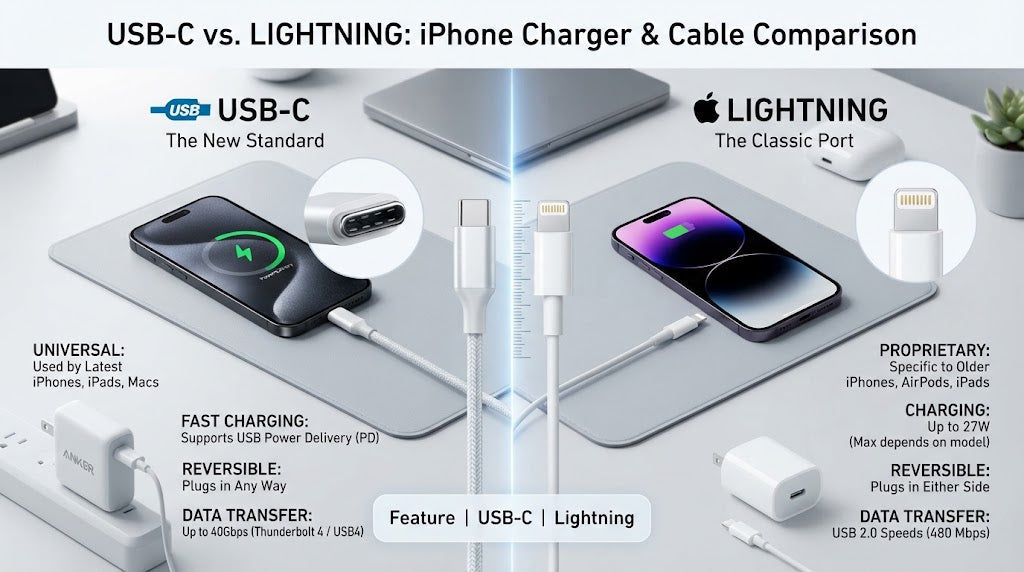
USB-C vs Lightning: What Charger Do You Need? | 2026 Guide
Author: Shah Zaib
Reviewed by: fonez4u2 Technical Team | Refurbished Smartphone Specialists
Last Updated: September 2026
Reading Time: 11–13 minutes
Quick Answer
The charger you need depends primarily on the charging port on your phone.
Newer iPhones from the iPhone 15 generation use USB-C, while older iPhones such as the iPhone 14, iPhone 13 and iPhone 12 use Lightning. Apple confirms that iPhone 15 and later models have a USB-C connector and can be charged using a compliant USB-C power adapter and cable.
If your phone has USB-C, you will generally use a USB-C to USB-C cable with a compatible USB-C power adapter. If you have a Lightning iPhone, you can use a USB-C to Lightning cable with a suitable USB-C Power Delivery charger.
For fast charging, the connector is only one part of the equation. Your phone, charger, cable and supported charging technology all matter.
The good news is that upgrading from Lightning to USB-C does not necessarily mean replacing your entire charging setup. If you already have a suitable USB-C wall adapter, you may only need a different cable.
Introduction
Choosing the right phone charger sounds simple until you start comparing USB-C, Lightning, USB-A, Power Delivery and different cable types.
For years, many iPhone users simply bought a Lightning cable and used it with their existing power adapter. Today, newer iPhones use USB-C, while Samsung Galaxy phones, newer iPads and many other modern devices also use USB-C.
That change is useful because one USB-C charging setup can potentially work across several devices. However, it can also create confusion when you have older and newer phones in the same household.
You might already have several chargers at home but still wonder whether they are suitable for your new refurbished phone. You may also be unsure whether you need USB-C to USB-C, USB-C to Lightning or USB-A to USB-C.
This guide explains USB-C vs Lightning in practical terms for customers in Ireland. We will cover the differences between the connectors, which iPhones use each one, how fast charging works, USB Power Delivery, cable compatibility, Samsung and iPad charging, common mistakes and what refurbished-phone buyers should check before purchasing a charger.
Key Takeaways
- iPhone 15 and later use USB-C.
- iPhone 14 and earlier use Lightning.
- USB-C phones generally use a USB-C to USB-C cable with a compatible USB-C charger.
- Lightning iPhones can use a USB-C to Lightning cable with a suitable USB-C power adapter.
- USB-C does not automatically mean the fastest possible charging.
- USB Power Delivery (USB-PD) is important for many modern fast-charging setups.
- A higher-wattage charger is not automatically better for every smartphone.
- USB-C can make it easier to share chargers between compatible phones, tablets and accessories.
- USB-C cables can have different power and data capabilities.
- Always check the exact phone model before buying a cable or charger.
- You may be able to keep an existing USB-C wall adapter when upgrading from Lightning to USB-C.
USB-C vs Lightning: What's the Difference?

USB-C and Lightning are different connector systems used for charging and, depending on the device and cable, data transfer.
USB-C is a widely adopted connector standard used across smartphones, tablets, laptops, headphones, power banks and many other devices. USB-IF describes USB Type-C as a connector ecosystem designed to support scalable power and performance.
Lightning is Apple's proprietary connector that was used on many earlier generations of iPhone and other Apple accessories.
Both connectors are reversible, but they are not interchangeable.
1. USB-C
USB-C is now common across modern technology.
You can find it on:
- Newer iPhones
- Samsung Galaxy smartphones
- Other Android phones
- Newer iPads
- Galaxy tablets
- Laptops
- Power banks
- Headphones and earbuds
- Other accessories
Its biggest practical advantage is compatibility across different product categories.
If your household has a USB-C iPhone, Samsung phone and USB-C tablet, you may be able to use the same type of charging cable and power adapter across those devices.
2. Lightning
Lightning was developed by Apple and was used on many iPhones before the transition to USB-C.
Examples include:
- iPhone 12
- iPhone 13
- iPhone 13 Pro
- iPhone 14
- iPhone 14 Pro Max
- iPhone SE 3rd Generation
Lightning is still relevant if you own an older iPhone or older Apple accessory.
3. USB-C vs Lightning comparison
| Feature | USB-C | Lightning |
|---|---|---|
| Connector | USB Type-C | Apple Lightning |
| Reversible | Yes | Yes |
| iPhone 15 and later | Yes | No |
| iPhone 14 and earlier | No | Yes |
| Samsung Galaxy phones | Yes | No |
| Common cable | USB-C to USB-C | USB-C to Lightning |
| Multi-device compatibility | Broad | More Apple-specific |
| USB-PD ecosystem | Widely supported on compatible devices | Can be used with compatible charging setups |
The important thing to remember is simple:
The cable must match the charging port on your device.
Which iPhones Use USB-C?

Apple moved the iPhone from Lightning to USB-C beginning with the iPhone 15 generation.
Apple's current support documentation states that iPhone 15 and later models have a USB-C connector.
For the fonez4u2 catalogue, this means customers looking at newer models such as the iPhone 15 Pro, iPhone 16, iPhone 16 Pro, iPhone 16 Pro Max and iPhone 17 series should expect USB-C charging.
1. iPhones with USB-C
Examples include:
- iPhone 15
- iPhone 15 Pro
- iPhone 15 Pro Max
- iPhone 16
- iPhone 16 Pro
- iPhone 16 Pro Max
- iPhone 17
- iPhone 17 Pro
- iPhone 17 Pro Max
- iPhone Air
The exact charging and data capabilities can vary between models, so always check the specific device specifications.
2. What about iPhone 14 and earlier?
Older iPhones continue to use Lightning.
For example:
- iPhone 12 → Lightning
- iPhone 13 → Lightning
- iPhone 13 Pro → Lightning
- iPhone 14 → Lightning
- iPhone 14 Pro Max → Lightning
- iPhone SE 3rd Generation → Lightning
This means the difference between an iPhone 14 Pro Max and an iPhone 15 Pro is not only the phone's features. Their physical charging connections are also different.
What Charger Does a USB-C iPhone Need?

If you own a USB-C iPhone, you need a suitable USB-C cable and compatible power adapter.
Apple recommends a USB-C Power Delivery charger and USB-C cable for faster wired charging on iPhone 15 models and later.
1. The basic USB-C setup
The charging arrangement looks like this:
USB-C iPhone → USB-C to USB-C cable → USB-C charger → wall socket
This is the simplest setup for a modern USB-C iPhone.
2. Can you use a third-party charger?
Yes, provided it is compatible and meets appropriate safety and charging requirements.
Apple states that iPhones can be charged using USB-C power adapters from Apple or other manufacturers that comply with the USB-C standard.
For customers, the important thing is not simply the brand name. Check the charger specifications, power output, USB-PD support and quality.
3. Do you need a 100W charger?
Not necessarily.
A charger being rated at 100W does not mean your smartphone will charge at 100W.
USB Power Delivery allows compatible devices and chargers to negotiate appropriate power delivery.
Therefore, buying the highest-wattage charger you can find is not automatically the best approach.
What Charger Does a Lightning iPhone Need?

If your iPhone has a Lightning port, the charging cable needs to have a Lightning connector on the phone side.
A modern setup can therefore look like:
Lightning iPhone → USB-C to Lightning cable → USB-C charger
1. USB-C to Lightning cable
A USB-C to Lightning cable has:
- USB-C connector on one end
- Lightning connector on the other
This allows an older Lightning iPhone to connect to a modern USB-C power adapter.
Apple's fast-charging guidance confirms that earlier iPhone models can use a USB-C to Lightning cable with a compatible USB-C Power Delivery adapter.
2. Can an iPhone 13 use a USB-C charger?
Yes.
An iPhone 13 has a Lightning port, but the charger itself can have a USB-C output.
You simply need:
USB-C charger + USB-C to Lightning cable + iPhone 13
This is useful if you already own a modern USB-C power adapter.
3. Do you need to replace the wall charger?
Not necessarily.
If your existing USB-C power adapter is compatible with your charging requirements, you may only need to replace the cable when moving between different connector types.
USB-C to USB-C vs USB-C to Lightning
This is one of the most important distinctions to understand before buying a cable.
1. USB-C to USB-C
Both ends use USB-C.
It is commonly used for:
- iPhone 15 and later
- Samsung Galaxy phones
- USB-C iPads
- Galaxy tablets
- Other Android phones
- Compatible headphones
- Other modern USB-C accessories
2. USB-C to Lightning
One end uses USB-C and the other uses Lightning.
It is commonly used with:
- iPhone 14
- iPhone 13
- iPhone 13 Pro
- iPhone 12
- Older Apple accessories
3. Quick compatibility guide
| Phone/device port | Charger output | Cable |
|---|---|---|
| USB-C | USB-C | USB-C to USB-C |
| Lightning | USB-C | USB-C to Lightning |
| USB-C | USB-A | USB-A to USB-C |
| Lightning | USB-A | USB-A to Lightning |
If you are unsure which cable to buy, look at the port on the phone first.
Does USB-C Charge Faster Than Lightning?
This is one of the most common questions about USB-C vs Lightning, but the answer is more complicated than simply saying "USB-C is faster."
The connector itself does not determine the complete charging performance.
Charging can depend on:
- Phone model
- Charger output
- Cable capability
- Charging protocol
- Battery condition
- Temperature
- Software
- Whether other devices are sharing a multi-port charger
Apple currently recommends USB-C Power Delivery charging for faster wired charging on iPhone 15 and later, while earlier iPhones can use a USB-C to Lightning cable with a suitable USB-PD adapter.
1. USB-C does not automatically mean fast charging
A USB-C connector alone does not guarantee a particular charging speed.
Two USB-C chargers may have different power outputs and supported charging technologies.
2. Your complete charging setup matters
For the best supported wired charging performance, consider:
Phone + charger + cable + charging protocol
All four elements should be appropriate for the intended charging speed.
What Is USB Power Delivery?

USB Power Delivery, commonly shortened to USB-PD, is a charging technology that allows compatible devices and chargers to negotiate power delivery.
USB-IF explains that USB Power Delivery provides more flexible power delivery over USB and can support a wide range of power levels depending on the implementation.
The USB-IF specification has continued to evolve, including the current USB Power Delivery specification and USB Type-C standards.
1. Why does USB-PD matter?
USB-PD is important because many modern phones use USB-C and support USB-PD-based charging.
For customers, this means a USB-PD charger can be a useful option when buying a charger intended for several modern devices.
2. Does USB-PD mean maximum charging speed?
No.
The phone still has its own charging limits.
A 65W or 100W USB-PD charger does not automatically make a phone charge at 65W or 100W.
3. Is USB-C the same thing as USB-PD?
No.
USB-C describes the connector system.
USB-PD describes a power-delivery technology.
This distinction is important when comparing chargers.
Can One Charger Work With an iPhone and Samsung?

Yes, a suitable USB-C charger can potentially be used with both.
For example:
USB-C iPhone → USB-C to USB-C cable → USB-C charger
and:
Samsung Galaxy → USB-C to USB-C cable → same USB-C charger
The charger may therefore be shared, although charging capabilities can vary between devices.
1. Newer iPhone example
iPhone 16 → USB-C to USB-C → USB-C PD charger
2. Samsung example
Samsung Galaxy S24 → USB-C to USB-C → USB-C charger
3. Older iPhone example
iPhone 13 → USB-C to Lightning → same USB-C charger
This is one of the practical benefits of moving towards USB-C.
What About USB-A Chargers?
USB-A is the older rectangular USB connector that many people still have at home.
A USB-A charger can still be useful with compatible devices and cables.
For example:
USB-A charger → USB-A to USB-C cable → compatible USB-C phone
may work.
However, if you are buying a new charger and want a modern setup, USB-C can offer broader compatibility with current smartphones and accessories.
1. Should you throw away your USB-A chargers?
No.
If an existing USB-A charger is safe, reliable and meets your needs, there is not necessarily a reason to replace it immediately.
However, when buying a new charger, USB-C may be a more practical long-term choice because many current devices use USB-C.
2. When does USB-C make more sense?
USB-C is particularly useful if you own multiple modern devices.
For example:
- iPhone 16
- Samsung Galaxy
- USB-C iPad
- Galaxy tablet
- USB-C AirPods case
A compatible USB-C charger can potentially simplify your charging setup.
USB-C Cable Quality Matters Too
A common mistake is to focus entirely on the wall charger and ignore the cable.
Not every USB-C cable necessarily provides identical capabilities.
USB-IF's current cable guidance includes power-capability markings for compliant USB-C-to-USB-C cables. USB-IF currently specifies 60W and 240W power markings for compliant USB-C-to-USB-C cables, with additional data-rate markings where applicable.
1. Why does this matter?
If you are charging a smartphone, a basic cable may be sufficient for your needs.
However, if you want to use the same cable with higher-powered devices, laptops or high-speed data equipment, cable capability becomes more important.
2. Check the cable before buying
Look for:
- Power capability
- Data-transfer capability where relevant
- Manufacturer information
- USB-IF compliance information where applicable
- Suitable construction and quality
3. Don't assume every USB-C cable is identical
The connector shape may look the same, but capabilities can differ.
This is particularly important when one cable is expected to serve several devices.
What About iPads and AirPods?

Apple's move towards USB-C has also affected its wider product range.
Many newer iPads use USB-C, while older models and accessories may still use Lightning.
AirPods also vary depending on the exact generation and charging case.
1. USB-C iPad
A USB-C iPad can use a suitable USB-C to USB-C cable and compatible USB-C charger.
2. Older Lightning accessories
Older accessories may still require Lightning.
This means a household can still have a mixture of:
USB-C cables + USB-C to Lightning cables
3. USB-C and Lightning accessories together
Apple also provides adapters that allow certain USB-C devices to connect with Lightning accessories.
The exact adapter required depends on the devices involved.
What Happens When You Upgrade From Lightning to USB-C?
This is particularly relevant to refurbished-phone buyers.
Imagine you currently have an iPhone 13 and upgrade to an iPhone 15 Pro.
Your old iPhone uses:
Lightning
Your newer iPhone uses:
USB-C
However, if your existing wall charger has a USB-C output, you may not need to replace the wall adapter.
You may simply change from:
USB-C charger + USB-C to Lightning cable
to:
USB-C charger + USB-C to USB-C cable
This can make upgrading less expensive and reduce unnecessary accessories.
1. Moving from iPhone 13 to iPhone 15
Old setup: USB-C charger + USB-C to Lightning
New setup: USB-C charger + USB-C to USB-C
2. Moving from iPhone 14 Pro Max to iPhone 16 Pro
The same basic principle applies.
The power adapter may remain useful, while the cable changes.
3. Why this matters for refurbished phones
When comparing refurbished devices, remember to consider accessories as part of the overall ownership experience.
This connects naturally with our previous guide, How to Choose the Right Phone Charger, which covers the wider process of selecting a suitable phone charger.
How to Choose the Right Charger in Ireland

Buying a charger should not be based solely on price or wattage.
A good charging setup should match your phone, accessories and everyday usage.
1. Check your exact phone model
Do not rely only on the word "iPhone" or "Samsung."
Different generations can use different connectors and support different charging capabilities.
2. Check the charging port
The easiest starting point is the physical port:
USB-C → USB-C cable
Lightning → Lightning cable
3. Check the charger's output
Look at the charger's technical specifications rather than choosing based only on its advertised wattage.
4. Check USB-PD support
If fast charging is important, look for USB Power Delivery support where your device supports it.
5. Check the cable
The cable also matters.
A charger and phone may support a particular charging capability, but the cable needs to be suitable as well.
6. Consider your other devices
If you own several USB-C devices, one suitable USB-C charger may be more convenient than maintaining separate charging systems.
Related guide: For a broader explanation of charger types, charging speeds and what to look for before purchasing, see our How to Choose the Right Phone Charger guide.
Common USB-C and Lightning Charging Mistakes

Understanding the terminology can prevent several common mistakes.
1. Buying USB-C to USB-C for a Lightning iPhone
An iPhone 13 has a Lightning port, so a USB-C connector cannot be plugged directly into the phone.
You need:
USB-C charger → USB-C to Lightning cable → iPhone
2. Assuming USB-C automatically means fast charging
USB-C describes the connector, not the complete charging capability.
3. Buying only based on wattage
A 100W charger is not automatically a better smartphone charger than a lower-wattage charger that properly meets your phone's requirements.
4. Ignoring cable capability
The cable can affect charging and data performance.
5. Buying poor-quality charging accessories
A charger connects to mains electricity, so quality and appropriate safety compliance matter.
6. Replacing your entire setup unnecessarily
If you already own a suitable USB-C power adapter, you may only need a different cable when changing from Lightning to USB-C.
USB-C vs Lightning for Refurbished Phone Buyers
Charging compatibility is especially worth considering when buying a refurbished smartphone.
Refurbished phones can cover several generations, meaning the charging connector may differ even between models that look relatively similar.
1. iPhone 12 and iPhone 13
These models use Lightning.
You should therefore have a suitable Lightning cable.
2. iPhone 14
The iPhone 14 series also uses Lightning.
3. iPhone 15 and newer
These use USB-C.
A USB-C to USB-C cable is therefore appropriate for standard wired charging with a USB-C power adapter.
4. Samsung Galaxy phones
Modern Samsung Galaxy phones use USB-C, making them compatible with the broader USB-C charging ecosystem.
5. Check before buying
Before purchasing a refurbished phone, check:
- Charging port
- Included accessories
- Cable requirement
- Fast-charging capability
- Existing charger compatibility
This can help you avoid unexpected accessory purchases after receiving your phone.
How We Assess Charging Compatibility at fonez4u2

At fonez4u2, understanding the device is only part of helping customers choose refurbished technology.
Charging compatibility also matters because a phone's charging port, cable requirements and supported charging technology can affect everyday use.
When assessing charging information, we consider:
- Exact device model
- Charging connector
- Compatible cable type
- Supported charging standards
- Power requirements
- Fast-charging capability
- Compatibility with common chargers
- Compatibility with other devices
- Manufacturer documentation
- Relevant technical standards
We distinguish between the physical connector, charging protocol, power output and cable capability rather than treating them as the same thing.
This is particularly important for refurbished phones because customers may be comparing several generations of the same device family.
Our approach is to use manufacturer information and recognised technical standards wherever possible, helping customers make accessory decisions based on the actual device rather than generic charger marketing.
USB-C Charging Across the fonez4u2 Catalogue
USB-C is relevant to many of the products in the fonez4u2 catalogue.
Depending on the exact model, this includes:
Apple iPhones
- iPhone 15 Pro
- iPhone 16
- iPhone 16 Pro
- iPhone 16 Pro Max
- iPhone 17
- iPhone 17 Air
- iPhone 17 Pro
- iPhone 17 Pro Max
Samsung Galaxy phones
- Samsung S21
- Samsung S22
- Samsung S24
- Samsung S24 Plus
- Samsung S24 FE
- Samsung S25
- Samsung S25 Ultra
- Samsung A05
- Samsung A06
- Samsung A07
- Samsung A16
- Samsung A17
- Samsung A26 5G
- Samsung A35 5G
- Samsung A36 5G
- Samsung A55 5G
- Samsung A56 5G
- Samsung Z Fold 6
- Samsung Z Fold 7
- Samsung Z Flip 7
Tablets
- Apple iPad 10th Generation
- Apple iPad 11th Generation
- Galaxy Tab A9
- Galaxy Tab A9 Plus
- Galaxy Tab A9+ 5G
The exact charging capabilities should always be checked against the individual model specification.
For older Lightning iPhones such as the iPhone 12, iPhone 13 Pro and iPhone 14 Pro Max, the relevant cable is USB-C to Lightning rather than USB-C to USB-C.
Which Charger Do You Need for Your Phone?
The following table gives a simple starting point for customers.
| Device | Charging Port | Cable With USB-C Charger |
|---|---|---|
| iPhone 12 | Lightning | USB-C to Lightning |
| iPhone 13 | Lightning | USB-C to Lightning |
| iPhone 13 Pro | Lightning | USB-C to Lightning |
| iPhone 14 | Lightning | USB-C to Lightning |
| iPhone 14 Pro Max | Lightning | USB-C to Lightning |
| iPhone 15 | USB-C | USB-C to USB-C |
| iPhone 15 Pro | USB-C | USB-C to USB-C |
| iPhone 16 | USB-C | USB-C to USB-C |
| iPhone 16 Pro | USB-C | USB-C to USB-C |
| iPhone 16 Pro Max | USB-C | USB-C to USB-C |
| iPhone 17 | USB-C | USB-C to USB-C |
| iPhone 17 Pro | USB-C | USB-C to USB-C |
| iPhone 17 Pro Max | USB-C | USB-C to USB-C |
| Samsung Galaxy S Series | USB-C | USB-C to USB-C |
| Samsung Galaxy A Series | USB-C | USB-C to USB-C |
| Samsung Z Fold / Z Flip | USB-C | USB-C to USB-C |
| USB-C iPad | USB-C | USB-C to USB-C |
| Galaxy Tab A9 Series | USB-C | USB-C to USB-C |
Important: This table identifies the connector/cable arrangement, not guaranteed charging speed. Exact charging performance depends on the device, charger, cable and supported charging technology.
Power Banks and USB-C Charging
A charger is not the only accessory where USB-C matters.
Power banks increasingly use USB-C for charging the power bank itself and/or charging connected devices.
This makes your previous Power Banks: What Capacity Do You Really Need? guide a natural next step for readers who want to understand battery capacity, charging output and how to choose a suitable portable charger.
When choosing a power bank, don't look only at its advertised capacity.
Also consider:
- USB-C input
- USB-C output
- Supported charging standards
- Output power
- Number of ports
- Device compatibility
- Size and portability
A high-capacity power bank may be useful for travel, but its output capabilities still need to match your devices.
Related guide: Power Banks: What Capacity Do You Really Need?
What Should You Check Before Buying a Charger?
Before buying a charger for your phone in Ireland, use this quick checklist.
1. Identify your phone
Know the exact model.
2. Check the port
USB-C and Lightning require different cables.
3. Check your existing charger
You may already own a suitable USB-C power adapter.
4. Check USB-PD
If fast charging matters, check whether the charger supports USB Power Delivery and whether your phone supports it.
5. Check the cable
Make sure the cable matches both the charger and phone.
6. Check quality and compliance
Avoid choosing a mains charger based solely on the lowest price.
7. Consider your wider setup
If you have several phones, tablets or accessories, a suitable USB-C charging setup may reduce the number of different chargers you need.
Final Thoughts
The move from Lightning to USB-C has changed how many people think about phone charging.
For customers buying a newer iPhone, Samsung Galaxy or USB-C tablet, USB-C can make charging more convenient because the same general connector ecosystem is used across many modern devices.
However, USB-C does not automatically mean every charger or cable is identical.
The best approach is to check the complete setup:
Phone → connector → cable → charger → charging protocol
If you have an older Lightning iPhone such as an iPhone 12, iPhone 13 Pro or iPhone 14 Pro Max, you can still use a modern USB-C power adapter with the correct USB-C to Lightning cable.
If you move to an iPhone 15 or later, you will need a USB-C cable instead.
For refurbished-phone buyers in Ireland, checking this before purchasing can help avoid unnecessary accessory costs and ensure you already have — or can easily obtain — the correct charging setup.
Final Verdict
USB-C is the standard you should expect on newer smartphones, while Lightning remains relevant for older iPhones and Apple accessories.
If your phone uses USB-C, a suitable USB-C to USB-C cable and compatible USB-C charger is the straightforward option.
If your phone uses Lightning, a USB-C to Lightning cable can connect it to a modern USB-C power adapter.
Rather than choosing a charger simply because it has a higher wattage, focus on compatibility, USB-PD support, cable capability, device requirements and charger quality.
For anyone buying a refurbished phone, checking the charging port before purchasing accessories is one of the simplest ways to avoid buying the wrong cable.
Frequently Asked Questions
USB-C vs Lightning FAQs
1. What is the difference between USB-C and Lightning?
USB-C is a widely adopted connector used across many modern smartphones, tablets and computers. Lightning is Apple's proprietary connector used on many older iPhones and Apple accessories.
2. Does the iPhone 15 use USB-C?
Yes. Apple moved the iPhone to USB-C beginning with the iPhone 15 generation.
3. Does the iPhone 14 use USB-C?
No. The iPhone 14 uses a Lightning connector.
4. What cable does an iPhone 13 Pro need?
The iPhone 13 Pro uses Lightning, so you can use a USB-C to Lightning cable with a compatible USB-C power adapter.
5. What cable does an iPhone 15 Pro need?
The iPhone 15 Pro uses USB-C, so a USB-C to USB-C cable is the standard choice with a USB-C charger.
6. Can I use a USB-C charger with an iPhone 13?
Yes. You need a USB-C to Lightning cable between the USB-C charger and iPhone.
7. Is USB-C faster than Lightning?
USB-C can support modern charging technologies and higher power capabilities, but the connector alone does not determine charging speed.
8. What is USB Power Delivery?
USB Power Delivery, or USB-PD, is a charging technology that allows compatible devices and chargers to negotiate power delivery.
9. Do I need a 100W charger for an iPhone?
Not necessarily. A phone only uses power according to its supported charging capabilities. Choose a charger based on the requirements of your devices.
10. Can one charger charge both iPhone and Samsung?
Yes, a suitable USB-C charger can potentially charge both. The cable may differ depending on whether the iPhone uses USB-C or Lightning.
11. Can I still use a USB-A charger?
Yes, compatible USB-A chargers and cables can still work with supported devices. However, USB-C chargers can offer a more modern charging setup for many current devices.
12. What is USB-C to Lightning?
It is a cable with USB-C on one end and Apple's Lightning connector on the other. It is commonly used with older Lightning iPhones and compatible Apple accessories.
13. What is USB-C to USB-C?
It is a cable with USB-C connectors on both ends. It is commonly used with newer iPhones, Samsung phones, iPads and other USB-C devices.
14. Can a high-wattage charger damage a phone?
A compatible charger does not simply force its maximum advertised wattage into the phone. However, use reputable chargers that meet appropriate safety and compatibility requirements.
15. Are all USB-C cables the same?
No. USB-C cables can have different power and data capabilities. USB-IF provides specifications and marking requirements for compliant USB-C cables.
16. Can I use an iPad charger with my iPhone?
A compatible USB power adapter can be used with an iPhone when paired with the appropriate cable and when the adapter meets the relevant charging requirements.
17. Do refurbished phones need special chargers?
Not necessarily. The required cable and charger depend on the exact phone model and its charging capabilities.
18. Should I buy a USB-C charger if I have a Lightning iPhone?
It can be useful, especially if you also use newer USB-C devices. You can continue charging the Lightning iPhone using a USB-C to Lightning cable.
19. How do I know which charger my phone needs?
Check the exact phone model, charging port, cable requirement, supported charging technology and charger output.
20. What charger should I buy for a refurbished phone?
Choose a reputable compatible charger based on the exact phone model, charging port, cable and supported charging technology rather than simply choosing the highest-wattage charger.
Sources & Verification
For technical accuracy, this article should be checked against manufacturer documentation and recognised standards rather than generic charger marketing.
Key sources include:
- Apple Support — Charge and connect with the USB-C connector on your iPhone
- Apple Support — About iPhone charge speeds
- Apple Support — Fast charge your iPhone
- Apple Support — USB-C to Lightning Adapter
- USB Implementers Forum — USB Power Delivery
- USB Implementers Forum — USB-C cables and connectors
USB-IF's current document library also shows updated USB Power Delivery and USB Type-C specifications during 2026, so technical details should be reviewed periodically as standards evolve.
About fonez4u2
fonez4u2 is an Ireland-based refurbished and SIM-free phone specialist offering refurbished smartphones, tablets, accessories and related services.
The business focuses on helping customers understand their device options, including compatibility, accessories and everyday smartphone requirements.
fonez4u2 — The Sim Free Specialist
2 Eyre Square, Galway H91 PT3F, Ireland
Phone / WhatsApp: 085 1330999


Leave a comment
This site is protected by hCaptcha and the hCaptcha Privacy Policy and Terms of Service apply.