
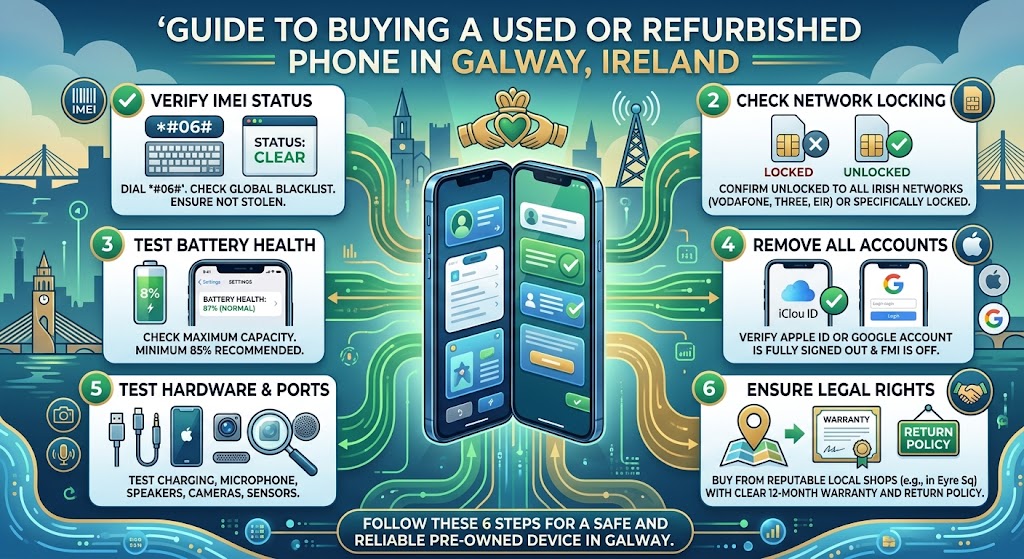
What to Check Before Buying a Used or Refurbished Phone? Complete 2026 Guide
Buying a used or refurbished phone can be a great way to get a quality smartphone for less than the cost of a brand-new device. However, the lower price should not be the only thing you consider. A phone may look excellent in photographs but still have an ageing battery, limited software support, hidden damage or other issues that affect its long-term value.
So, what should you check before buying a used or refurbished phone?
The answer goes beyond checking the screen and making sure the phone turns on. You should consider the device's age, battery health, software support, physical condition, IMEI status, network compatibility, storage, cameras, charging system, warranty and return policy.
For shoppers in Ireland, it is also important to understand the difference between a privately sold used phone and a professionally refurbished device. The quality, testing and protection offered can vary considerably between sellers.
This guide provides a practical checklist for 2026, helping you assess a used or refurbished smartphone before spending your money.
Used vs Refurbished Phone: What's the Difference?
Before checking a phone, it helps to understand what you are actually buying.
A used phone is generally a previously owned device being sold again. Depending on where you buy it, it may have received little more than a basic inspection or cleaning.
A refurbished phone has usually gone through some form of inspection, testing, cleaning or repair before being offered for resale. However, refurbishment standards are not identical across every retailer.
This means the word "refurbished" should not automatically be treated as a guarantee of condition.
When comparing a refurbished device, ask:
-
Has the phone been tested?
-
Which components have been checked?
-
Has the battery condition been assessed?
-
Are faults repaired before sale?
-
What cosmetic grade does the seller use?
-
Is a warranty included?
-
What is the return policy?
For a broader introduction to choosing a refurbished device in Ireland, see our How to Choose a Refurbished Phone in Ireland: 2026 Guide.
1. Check the Phone's Exact Model and Age

One of the first things to establish is the phone's exact model.
"iPhone" or "Samsung Galaxy" is not enough information. Different generations can have significantly different processors, cameras, displays, battery capacities and software-support periods.
Find out:
-
Exact model name
-
Storage capacity
-
Release generation
-
Model number where applicable
-
Original release period
The phone's age is particularly important because it helps you estimate how much useful life may remain.
For example, a three-year-old flagship with strong hardware and good software support could still be a sensible purchase. An older phone with limited remaining support may offer less long-term value even if its price looks attractive.
For more information about assessing remaining useful life, read How Long Should a Refurbished Phone Last? Complete 2026 Guide.
2. Check Battery Health and Condition

Battery condition is one of the most important checks when buying a pre-owned smartphone.
Lithium-ion batteries naturally lose capacity over time. A phone can still work normally while providing significantly less usage between charges than it did when new.
If you are buying an iPhone, check its available battery-health information where supported. For other devices, look for battery diagnostics provided by the manufacturer or seller.
Pay attention to signs such as:
-
Battery draining unusually quickly
-
Unexpected shutdowns
-
Excessive heat
-
Very slow charging
-
Battery percentage behaving inconsistently
Battery health should always be considered alongside the phone's age and price.
If you're specifically shopping for an iPhone, our guide iPhone Battery Health: What Percentage Is Good Before Buying? explains this in greater detail.
3. Check Software Updates and Support

A phone's hardware may still work perfectly while its software becomes outdated.
Before buying an older device, check whether it is still receiving operating-system and security updates.
This matters because software support can affect:
-
Security
-
App compatibility
-
Performance
-
New features
-
Banking and other essential applications
-
Long-term usability
Do not assume that two phones released around the same time have identical support periods.
If you plan to keep the phone for several years, a slightly newer model with longer expected support can sometimes be better value than an older device that costs less initially.
4. Inspect the Screen and Display

The display is one of the easiest components to inspect and one of the most expensive to overlook.
Check the entire screen under good lighting.
Look for:
-
Cracks
-
Deep scratches
-
Dead pixels
-
Bright or dark spots
-
Screen burn-in where relevant
-
Touchscreen problems
-
Uneven brightness
-
Discolouration
Open several applications and move your finger across different areas of the screen to confirm that touch input responds consistently.
Cosmetic marks are not necessarily a problem if they match the seller's advertised grade. The important thing is understanding exactly what condition you are paying for.
For example, a Grade A phone may have fewer visible signs of previous use than a lower cosmetic grade. However, grading systems vary between retailers, so always read the seller's own description. Our guide What Does Grade A Refurbished Phone Mean? 2026 Guide explains why this distinction matters.
5. Test the Cameras

Camera problems are not always obvious from a quick inspection.
Open the front and rear cameras and test them in different lighting conditions.
Check:
-
Main camera
-
Ultra-wide camera where available
-
Telephoto camera where available
-
Front camera
-
Autofocus
-
Flash
-
Video recording
-
Camera switching
Take a few photographs and inspect them for unusual spots, excessive blur or focusing problems.
Also check whether the camera glass has cracks or heavy scratches. Damage to the external lens area can affect image quality even when the camera application appears to work normally.
6. Check the Charging Port and Charging Performance

A charging port experiences repeated physical use, so it deserves careful attention.
Inspect the port for visible damage, dirt or signs of excessive wear.
If you have an opportunity to test the phone, confirm that it:
-
Starts charging normally
-
Maintains a stable connection
-
Does not require the cable to be held at an unusual angle
-
Recognises compatible accessories
-
Charges at an expected rate
Wireless charging, where supported, should also be tested if it is an important feature for you.
A damaged charging system can turn an otherwise attractive phone into an expensive repair project.
7. Test Speakers and Microphone

Audio components are easy to overlook during a purchase.
Play music or a video at different volume levels and listen for:
-
Distortion
-
Crackling
-
Very low volume
-
Uneven sound
Then test the microphone using a voice recording or phone call.
If the phone is intended for work, calls and video meetings, these components are particularly important.
Do not assume that a phone is fully functional simply because the screen and camera work.
8. Check Face ID, Touch ID or Other Biometrics

Biometric features can be essential for convenient authentication.
Depending on the phone, test:
-
Face recognition
-
Fingerprint sensor
-
Passcode functionality
-
Proximity sensor
If biometric authentication is not working, investigate why before buying.
Some repairs can affect specific biometric functions, and replacing a component does not always restore every original feature.
This is another reason why professional testing and a clear warranty can be valuable when buying refurbished.
9. Check Wi-Fi, Bluetooth, GPS and Mobile Connectivity

A smartphone is more than its display and processor.
Check the connectivity features you actually use.
Where possible, test:
-
Wi-Fi
-
Bluetooth
-
Mobile signal
-
4G/5G compatibility
-
GPS/location services
-
NFC where relevant
-
Personal hotspot
A phone that looks perfect but has unreliable connectivity may quickly become frustrating.
For buyers in Ireland, also confirm that the device is compatible with your intended mobile network and that it is SIM-free or unlocked if that is what you require.
10. Check IMEI, Network Status and SIM Compatibility

The IMEI identifies the individual mobile device.
Before purchasing a used phone, make sure the IMEI information is available and consistent with the device documentation where applicable.
You should also confirm that the phone is not reported as lost or stolen and that there are no network restrictions that could prevent you from using it.
For a SIM-free purchase, check that the phone is genuinely unlocked and compatible with your preferred network.
Never ignore an unexplained discrepancy between the phone's identifiers, packaging or seller information.
11. Look for Water or Physical Damage

Physical damage can sometimes be hidden.
Inspect:
-
Frame
-
Back panel
-
Camera glass
-
Screen edges
-
Buttons
-
Charging port
-
SIM tray area
Be particularly cautious about significant dents or gaps around the body because they can indicate a previous impact.
Water exposure is another concern. Even phones advertised with water resistance should not be treated as permanently waterproof. Seals can deteriorate over time, and previous damage or repairs may affect resistance.
If the seller provides information about liquid-damage checks, review it carefully.
12. Check Storage Capacity

Storage affects how comfortably you can use the phone over several years.
Think about how you use your device.
Someone who mainly sends messages and browses the web may have very different storage requirements from someone who records lots of 4K video or keeps a large offline media library.
Before buying, check the actual storage capacity rather than relying only on the product name.
Also consider whether the phone supports expandable storage. Many modern smartphones do not.
If you're buying an iPhone, our guide How Much iPhone Storage Do You Really Need in 2026? can help you choose capacity based on your usage.
13. Understand the Refurbished Grade
If a phone is advertised as Grade A, Grade B or Grade C, find out exactly what that grade means from the retailer.
There is no single universal cosmetic grading system that guarantees identical condition across every seller.
One retailer's Grade A phone may have different cosmetic criteria from another retailer's Grade A device.
Look for information covering:
-
Screen condition
-
Body condition
-
Battery expectations
-
Functional testing
-
Cosmetic marks
-
Accessories
-
Warranty
A clear grading policy is much more useful than simply seeing a letter grade.
14. Ask What Testing and Refurbishment Was Completed
This is one of the most important differences between simply buying a used phone and buying from a refurbishment-focused seller.
Ask what has actually been checked.
A thorough testing process may include relevant functions such as:
-
Display and touchscreen
-
Cameras
-
Speakers
-
Microphones
-
Buttons
-
Charging
-
Connectivity
-
Battery
-
Biometrics
The exact process can vary between sellers and models.
What matters is transparency. A trustworthy seller should be able to explain the condition of the device and the standards used to prepare it for resale.
For additional practical checks, read Refurbished Phones: What to Check Before You Buy.
15. Check Warranty and Return Policy
Price is only one part of the purchase.
A clear warranty and reasonable return policy can provide important protection if a problem appears after purchase.
Before ordering, check:
-
Warranty length
-
What the warranty covers
-
What is excluded
-
Return period
-
Return conditions
-
Who pays return delivery where applicable
-
How faults are reported
Do not assume that every refurbished seller offers identical protection.
Keep your order confirmation and any relevant documentation until you are satisfied that the phone is working as expected.
16. Compare Price With Similar Phones
A cheap phone is not automatically a good deal.
Compare the device with similar models based on:
-
Age
-
Storage
-
Battery condition
-
Cosmetic grade
-
Warranty
-
Software support
-
Overall specifications
A phone that costs slightly more but has better remaining software support and a healthier battery may provide considerably better value.
Think about cost versus remaining useful life, rather than focusing only on the price shown on the product page.
17. Consider How Long the Phone Can Last

Before buying, ask yourself how long you expect to keep the phone.
If you want to use it for another three or four years, buying an older device with limited software support may not make sense.
On the other hand, if you need an affordable phone for a shorter period, an older refurbished model could still be suitable.
The ideal purchase depends on your budget, usage and expected ownership period.
This is why our guide How Long Should a Refurbished Phone Last? Complete 2026 Guide is useful alongside this checklist.
Used Phone Buying Checklist
If you are buying a phone from a private seller or marketplace, pay particular attention to the device's history and identifiers.
Before handing over your money, check:
-
Exact model
-
Storage
-
IMEI
-
SIM/network status
-
Battery condition
-
Screen
-
Cameras
-
Charging
-
Speakers
-
Microphone
-
Buttons
-
Connectivity
-
Physical damage
-
Water-damage indicators where available
-
Account locks
-
Included accessories
-
Proof of purchase where relevant
Never rush because a seller claims that another buyer is waiting.
A few minutes of careful testing can help you avoid an expensive mistake.
Refurbished Phone Buying Checklist
When buying from a refurbishment-focused retailer, add these checks:
-
What refurbishment work was completed?
-
What components were tested?
-
What battery information is provided?
-
What cosmetic grade is being used?
-
Is the phone unlocked?
-
Is it SIM-free if advertised as SIM-free?
-
What warranty is included?
-
What is the return policy?
-
Are accessories included?
-
Is the product description clear?
-
Does the price make sense compared with similar devices?
The advantage of buying refurbished from an established retailer is that you may have clearer information about the device's condition and greater consumer protection than you would from an unknown private seller.
Common Mistakes to Avoid
1. Choosing the Cheapest Phone
The lowest price can be tempting, but an unusually cheap phone may have compromises in battery condition, physical state, software support or warranty.
2. Ignoring Battery Health
A phone with an ageing battery may require replacement sooner than expected.
3. Buying Based Only on Cosmetic Condition
A phone can look excellent while having functional problems. Always consider internal performance and testing.
4. Forgetting Software Support
A cheap older device may become less useful if important applications or security updates are no longer supported.
5. Assuming Every Grade A Phone Is Identical
Grading policies differ between retailers. Always read the actual grading description.
6. Ignoring the Warranty
Two phones with similar prices can provide very different levels of protection.
7. Buying Too Little Storage
If you plan to keep the phone for several years, insufficient storage can become frustrating as your apps, photos and videos grow.
8. Not Checking Network Compatibility
An otherwise good phone is not useful if it cannot work properly with your intended SIM or network.
What Is More Important: Phone Age or Condition?
Both matter, but neither should be considered alone.
A relatively old phone in excellent condition may still have less long-term value than a newer device if its software support is nearly finished.
Similarly, a newer phone with a heavily worn battery may require additional expense.
The better question is:
How much useful life does this particular phone have left for my needs?
Consider age, battery, software, hardware and price together.
Is a Refurbished Phone Better Than a Used Phone?
Not automatically, but a professionally refurbished phone can offer advantages when the seller provides clear testing, condition information, warranty and returns.
A privately sold used phone may be cheaper, but you may have less information about its history and fewer protections if something goes wrong.
The right choice depends on your budget and how much certainty you want before purchasing.
For a wider comparison, see Refurbished iPhone vs New iPhone in Ireland: Which Is Better?.
What Type of Refurbished Phone Should You Buy?
There is no single best refurbished phone for everyone.
Your choice should depend on what you actually need.
1. For Everyday Use
Prioritise battery life, reliable performance, software support and sufficient storage.
2. For Photography
Focus on camera hardware, image processing, storage and battery condition.
3. For Gaming
Look for a capable processor, sufficient RAM, good thermal performance and a battery in suitable condition.
4. For Business
Software support, security, battery endurance, connectivity and reliability should take priority.
5. For Budget Buyers
Consider previous-generation flagship devices rather than automatically choosing the newest low-cost model.
Our Best Refurbished Phones in Ireland for Every Budget 2026 guide can help you compare options based on different budgets and requirements.
A Simple 5-Minute Inspection Before Buying
If you are physically inspecting a used phone, follow this quick process:
Minute 1 – Exterior:
Check the screen, frame, back, cameras and charging port.
Minute 2 – Battery and charging:
Review available battery information and test charging if possible.
Minute 3 – Core functions:
Test the touchscreen, buttons, cameras, speakers and microphone.
Minute 4 – Connectivity:
Check Wi-Fi, Bluetooth, mobile signal and other features important to you.
Minute 5 – Purchase details:
Confirm IMEI, SIM status, storage, warranty, returns and final price.
This simple process will not identify every possible fault, but it can help you catch many obvious issues before completing a purchase.
Frequently Asked Questions
1. What should I check first when buying a refurbished phone?
Start with the exact model, age, battery condition, software support and overall physical condition. Then check functionality, warranty and return terms.
2. Is it safe to buy a used phone?
It can be, provided you verify the phone's condition, IMEI, network status, functionality and seller information before purchasing.
3. Is refurbished better than used?
A professionally refurbished phone may provide more information, testing and protection than a privately sold used phone, but standards vary between sellers.
4. How do I check the battery of a refurbished phone?
Use the battery-health information available on the device where supported, or ask the seller what battery testing and condition information they provide.
5. Should I buy a three-year-old refurbished phone?
It can be a sensible option if the device has suitable performance, acceptable battery condition, sufficient software support and a price that reflects its age.
6. Why is software support important?
Software and security updates can affect application compatibility, security and how useful the phone remains over time.
7. What does Grade A refurbished mean?
Grade A usually refers to a higher cosmetic condition, but grading standards vary. Always check the retailer's specific definition.
8. Should I check the IMEI before buying?
Yes. Checking the IMEI and network status can help identify potential problems such as network restrictions or reported lost or stolen devices.
9. How much storage should I choose?
Choose storage based on how you use your phone. Heavy photo, video and app users generally need more capacity than people with lighter storage requirements.
10. What warranty should a refurbished phone have?
The important point is to understand the warranty being offered, including its duration, coverage, exclusions and claim process.
11. Can an older refurbished phone last for several years?
Yes, depending on its model, battery condition, hardware and remaining software support. Age alone does not determine remaining useful life.
12. What is the biggest mistake when buying refurbished?
Focusing only on the price is one of the biggest mistakes. Battery condition, software support, testing, warranty and overall condition should all be considered.
Final Verdict
Knowing what to check before buying a used or refurbished phone can make the difference between a smart purchase and an expensive disappointment.
Do not judge a smartphone solely by its appearance or price. Check the model and age, battery condition, software support, display, cameras, charging system, connectivity, IMEI, storage, refurbishment grade, warranty and return policy.
If you are buying privately, take time to test the device and verify its details. If you are buying refurbished from a retailer, look for transparency around testing, condition and after-sales protection.
Most importantly, think about how long you want to keep the phone. A device that costs slightly more but has better battery health, stronger hardware and longer software support may provide considerably better value over time.
The best refurbished phone is not necessarily the cheapest one. It is the one whose condition, remaining useful life, features and price make sense for your needs.
Choose a Refurbished Phone With Confidence
A good refurbished phone is about more than price. Check battery health, software support, device condition and refurbishment quality before you buy, then choose a model that suits your everyday needs and expected years of use.
Explore refurbished phones in Ireland and make a more informed choice with Fonez4u Limited.
About Fonez4u Limited

Fonez4u Limited, the Sim Free Specialist, is a leader in Ireland for Sim Free Phones, Tablet / Phone Accessories, Device Repair & Phone Unlocking.
Shop Address: 2 Eyre Square, Galway, H91 PT3F
Phone: (085) 133 0999
WhatsApp: 085 133 0999
About the Author
Shah Zaib is a technology content writer who focuses on refurbished phones, smartphone buying guides, device care and consumer technology. His work is centred on making technical information easier to understand so readers can make more informed decisions when choosing, maintaining or comparing smartphones.
For this guide, the focus is on practical checks that matter when evaluating a used or refurbished phone, including battery health, software support, device condition, functionality, warranty and long-term value.
About This Guide
This guide was created to help shoppers make a more informed decision when comparing used and refurbished smartphones in 2026. It focuses on the practical checks that can affect a phone's reliability, usability and value, from battery condition and software support to physical inspection, network compatibility and seller protection.
The information is particularly relevant to buyers in Ireland who want to understand what to look for before purchasing a pre-owned smartphone.
Last Updated: 9 September 2026

Leave a comment
This site is protected by hCaptcha and the hCaptcha Privacy Policy and Terms of Service apply.