
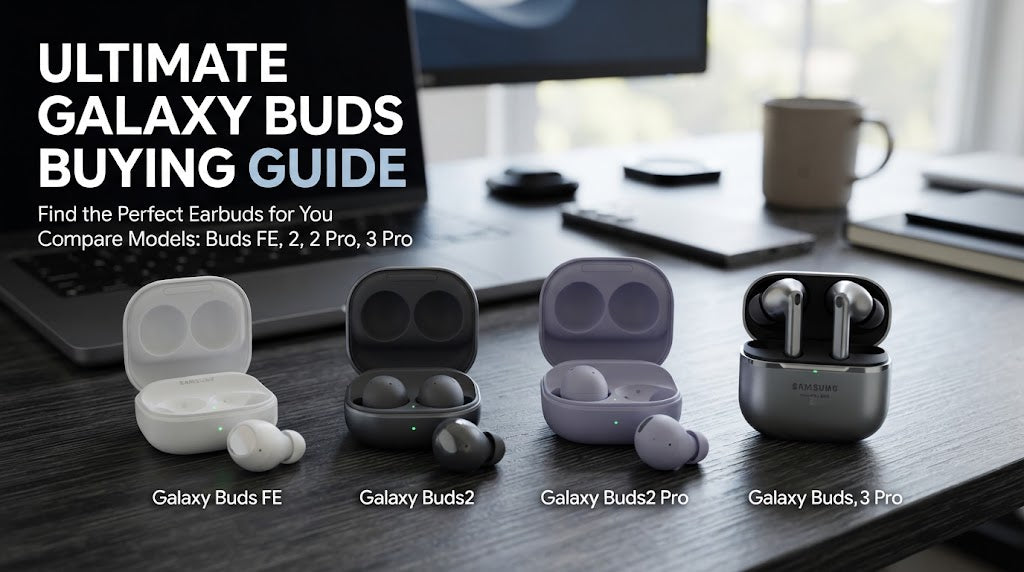
Samsung Galaxy Buds Buying Guide: Which Model Is Right for You?
Author: SHAH ZAIB
Reviewed by: fonez4u2 Technical Team | Refurbished Smartphone Specialists
Last Updated: September 2026
Reading Time: 12–15 minutes
Choosing wireless earbuds is no longer simply about finding the cheapest pair available. Modern earbuds can differ considerably in sound quality, Active Noise Cancellation (ANC), microphone performance, battery life, comfort, water resistance, connectivity and smart features.
Samsung's Galaxy Buds range is particularly relevant for people already using Samsung Galaxy smartphones, but different Galaxy Buds generations and designs target different types of users.
For shoppers in Ireland, the decision can become even more important when choosing between a current model, an older generation or a refurbished pair. The right choice depends on how you listen, where you use your earbuds and which smartphone you already own.
This Samsung Galaxy Buds buying guide explains the key differences you should understand before buying, including ANC, sound quality, battery life, comfort, fitness use, calls, Samsung ecosystem features and refurbished buying considerations.
Quick Answer: Which Samsung Galaxy Buds Are Right for You?
There is no single Galaxy Buds model that is ideal for every user. The right choice depends on your priorities.
| Your Main Requirement | What to Prioritise |
|---|---|
| Everyday music and podcasts | Comfort, sound quality and battery life |
| Commuting | ANC, ambient sound and battery life |
| Office calls | Microphone quality and comfort |
| Exercise | Secure fit and appropriate resistance rating |
| Long listening sessions | Comfort and battery life |
| Samsung Galaxy smartphone | Samsung ecosystem integration |
| Travel | ANC, battery life and compact charging case |
| Budget-conscious buying | Previous-generation or refurbished models |
| Premium listening | Advanced audio and ANC features |
| Frequent phone calls | Microphone performance and call controls |
The newest Galaxy Buds are not automatically the best choice for every shopper. If you do not need every premium feature, an older or more affordable model may meet your requirements perfectly well.
Understanding the Samsung Galaxy Buds Lineup

Samsung has released multiple generations and variants of Galaxy Buds over the years. The exact range available in Ireland can change, so it is important to check the specific model and generation rather than relying only on the Galaxy Buds name.
1. Standard Galaxy Buds
Standard Galaxy Buds are generally aimed at everyday users who want convenient wireless audio without necessarily paying for every premium feature.
They can be suitable for:
-
Music
-
Podcasts
-
YouTube and video
-
Phone calls
-
Commuting
-
Studying
-
General everyday listening
For many people, this type of model provides a sensible balance between features and usability.
2. Premium Galaxy Buds
Premium models typically introduce more advanced features and are aimed at users who want a more sophisticated listening experience.
Depending on the generation, these can include:
-
More advanced ANC
-
Improved microphone systems
-
Enhanced sound processing
-
Additional Samsung ecosystem features
-
Improved durability
-
Better environmental sound controls
-
More advanced audio functionality
These features can be particularly useful for frequent commuters, travellers and people who use earbuds for several hours every day.
3. Previous-Generation Galaxy Buds
Older Galaxy Buds can still be worth considering.
A previous-generation model may provide many of the features required for everyday listening while costing less than the latest generation.
However, always compare:
-
Battery condition
-
Software support
-
ANC capability
-
Bluetooth version
-
Water-resistance rating
-
Charging method
-
Warranty
-
Physical condition
This becomes particularly important when purchasing refurbished earbuds.
Galaxy Buds and Samsung Galaxy Smartphones

One of the biggest reasons people choose Galaxy Buds is the Samsung ecosystem.
If you already use a Samsung Galaxy smartphone, compatible Galaxy Buds can integrate more closely with your device than many generic Bluetooth earbuds.
1. Samsung Ecosystem Integration
Depending on the specific combination of phone and earbuds, users may have access to features such as:
-
Easier pairing
-
Battery information
-
Earbud controls
-
Sound customisation
-
Device management
-
Firmware updates
-
Additional Galaxy ecosystem functions
The exact features can vary by model, software version and region.
2. Galaxy Buds With Other Android Phones
Galaxy Buds are not limited to Samsung smartphones.
Compatible Android phones can connect to Galaxy Buds through Bluetooth, although certain Samsung-specific features may not be available on every device.
Before purchasing, check the requirements for the exact Galaxy Buds model you are considering.
3. Galaxy Buds With iPhone
Galaxy Buds can be used as Bluetooth earbuds with compatible Apple devices, but the experience may not provide all of the Samsung-specific functionality available on Galaxy smartphones.
If you use an iPhone, focus particularly on the basic functions you actually need rather than assuming every Galaxy Buds feature will be available.
Active Noise Cancellation: Is ANC Worth It?

Active Noise Cancellation is one of the most important features to consider when comparing modern wireless earbuds.
ANC uses microphones and electronic processing to reduce certain external sounds.
It can be especially useful in:
-
Public transport
-
Airports
-
Busy offices
-
Cafés
-
Shared workspaces
-
Noisy homes
1. ANC for Irish Commuters
If you regularly travel by bus or train, ANC can make listening more comfortable.
It can reduce certain continuous background sounds, allowing you to hear music, podcasts or videos more clearly without relying entirely on higher volume.
This can make ANC particularly useful for people commuting between cities or travelling regularly around Ireland.
2. ANC Does Not Block Everything
ANC should not be understood as complete silence.
It generally works more effectively against continuous low-frequency sounds than sudden or irregular noises.
You may still hear:
-
Nearby conversations
-
Sudden announcements
-
Horns
-
Loud voices
-
Sharp environmental sounds
This is why ambient or transparency mode is also useful.
3. Ambient Sound and Transparency Modes
Ambient sound modes use the earbuds' microphones to let external sounds reach your ears.
This can be useful when:
-
Speaking to someone
-
Listening for transport announcements
-
Walking outdoors
-
Ordering at a café
-
Working in an office
For many buyers, having both ANC and ambient sound gives greater flexibility than ANC alone.
Sound Quality: What Actually Matters?

Sound quality is partly subjective, but some technical characteristics are worth understanding before you buy.
1. Bass Performance
Bass affects low-frequency sounds such as kick drums and bass guitars.
If you mainly listen to:
-
Hip-hop
-
Electronic music
-
Pop
-
Dance
-
Bass-heavy playlists
you may prefer a stronger low-end presentation.
However, excessive bass can sometimes reduce the perceived clarity of vocals and instruments.
2. Vocal and Midrange Clarity
Midrange frequencies are particularly important for:
-
Podcasts
-
Audiobooks
-
Voice content
-
Video dialogue
-
Vocals
If most of your listening is spoken content, a balanced and clear sound profile may be more useful than maximum bass.
3. Treble and Detail
Treble contributes to high-frequency details such as cymbals and higher-pitched vocals.
A good balance should provide detail without becoming unpleasant or excessively sharp.
4. Equaliser Controls
Compatible Galaxy Buds setups may provide sound customisation options.
An equaliser can allow you to adjust the sound according to your preferences.
This is useful because there is no single sound profile that everyone enjoys.
Earbud Fit and Comfort

Comfort is one of the most overlooked parts of buying wireless earbuds.
A technically impressive pair can still be a poor choice if it hurts after 30 minutes.
1. Ear Tip Size
For in-ear models, the correct ear-tip size can influence:
-
Comfort
-
Bass response
-
Passive isolation
-
ANC effectiveness
-
Stability
A poor seal can reduce sound quality and make ANC less effective.
2. Different Ears Need Different Fits
Everyone's ears are different.
A pair that feels secure for one person may feel loose or uncomfortable for another.
If possible, try different ear-tip sizes and wear the earbuds for an extended period before deciding whether the fit is right.
3. Comfort for Long Listening
If you study, work or travel while wearing earbuds for several hours, comfort should be one of your main purchasing criteria.
A slightly less feature-rich model that remains comfortable throughout the day can be more practical than a premium model that becomes uncomfortable quickly.
Battery Life and Charging

Battery performance affects how convenient earbuds are in everyday life.
You should consider both the earbuds' individual listening time and the additional charging provided by their case.
1. Earbud Battery Life
Actual battery life can vary depending on:
-
Volume
-
ANC
-
Ambient sound
-
Calls
-
Bluetooth connection
-
Other active features
Therefore, advertised maximum battery figures should not always be treated as the exact amount you will experience.
2. Charging Case
The charging case effectively acts as a portable battery for the earbuds.
This is particularly useful for:
-
Students
-
Commuters
-
Office workers
-
Travellers
-
Frequent callers
3. USB-C Charging
USB-C has become increasingly common across modern smartphones and accessories.
If you already use USB-C devices, having earbuds with a USB-C charging case can simplify your travel setup.
Our guide on how to choose the right phone charger also covers important considerations around USB-C, charging standards and safe charging.
4. Wireless Charging
Some Galaxy Buds generations and cases support wireless charging.
This can be convenient if you already have a wireless charging setup.
However, it should not necessarily be a deciding factor if you are happy using a USB-C cable.
Water Resistance and Fitness Use
If you intend to wear Galaxy Buds while exercising, check the exact resistance rating of the model.
Do not assume that all Galaxy Buds generations offer identical protection.
1. Gym and Indoor Exercise
For gym use, consider:
-
Secure fit
-
Sweat resistance
-
Comfort
-
Easy controls
-
Battery life
Earbuds that move around during exercise can become distracting.
2. Running and Outdoor Exercise
Outdoor users may want to consider:
-
Secure fit
-
Environmental awareness
-
Ambient sound mode
-
Battery life
-
Weather considerations
-
Appropriate resistance rating
Ambient sound can be useful when you need to remain aware of your surroundings.
3. Water Resistance Is Not Waterproofing
A water-resistance rating does not automatically mean earbuds can be submerged or used for swimming.
Always follow the manufacturer's guidance for the specific model.
Microphone and Call Quality

Many people now use wireless earbuds as much for calls as for music.
Microphone quality can therefore be an important buying factor.
1. Quiet-Environment Calls
In a quiet room, most modern quality earbuds should provide reasonable voice communication.
The bigger differences often appear when background noise increases.
2. Outdoor Calls
If you frequently make calls outside, look for earbuds designed to manage environmental noise effectively.
Potential challenges include:
-
Wind
-
Traffic
-
Crowds
-
Shops
-
Public transport
Do not judge microphone quality solely by the number of microphones. Software processing and environmental conditions also affect the final result.
3. Video Meetings
For remote work and online meetings, consider:
-
Voice clarity
-
Comfort
-
Battery life
-
Bluetooth reliability
-
Easy mute/call controls
-
Compatibility with your computer
Bluetooth and Connectivity

Wireless earbuds rely heavily on Bluetooth connectivity, so compatibility matters.
1. Bluetooth Compatibility
Check that your smartphone, tablet or laptop supports the required Bluetooth functionality for the Galaxy Buds model you want.
Basic Bluetooth audio may work across many devices, while advanced features can have additional requirements.
2. Connection Stability
A good pair of earbuds should maintain a stable connection during normal use.
However, connection performance can also be affected by:
-
Device compatibility
-
Software
-
Distance
-
Physical obstructions
-
Wireless interference
3. Multiple Device Use
If you regularly move between your phone, tablet and laptop, check whether the specific Galaxy Buds model supports the type of device switching you want.
This can be particularly useful for people who work across several devices.
Galaxy Buds for Different Types of Users

Your daily routine should influence your choice more than marketing terminology.
1. Students
Students may prioritise:
-
Comfortable long-term use
-
Clear vocals
-
Good battery life
-
Reliable connectivity
-
Reasonable cost
If you mainly listen to lectures, podcasts and music, advanced premium features may not be essential.
2. Commuters
For commuters, consider:
-
ANC
-
Ambient sound
-
Battery life
-
Comfort
-
Call quality
-
Compact charging case
3. Fitness Users
Fitness users should prioritise:
-
Secure fit
-
Suitable resistance rating
-
Comfortable ear tips
-
Easy controls
-
Reliable battery life
4. Office Workers
Office workers may benefit from:
-
Clear microphone performance
-
Comfortable fit
-
Ambient sound
-
Call controls
-
Stable connectivity
5. Frequent Travellers
Travellers may get more value from:
-
ANC
-
Long battery life
-
Comfortable fit
-
Compact case
-
USB-C charging
-
Good call performance
New vs Refurbished Samsung Galaxy Buds

For shoppers trying to manage their budget, refurbished technology can be an alternative to buying brand-new products.
However, earbuds require more careful inspection than many other electronics because they contain small batteries and are worn directly in the ears.
1. Check Battery Condition
Lithium-ion batteries naturally lose capacity over time.
When considering refurbished earbuds, ask whether the battery condition has been checked and whether the retailer provides any relevant guarantee.
2. Check Hygiene and Cleaning
Because earbuds are inserted into the ears, cleanliness is particularly important.
A reputable refurbished seller should have a clear process for cleaning and preparing returned devices before resale.
3. Check the Charging Case
Do not focus only on the earbuds.
Check whether the charging case:
-
Charges correctly
-
Holds charge
-
Has the correct connector
-
Shows signs of damage
-
Is included with the product
4. Check Warranty and Returns
Before purchasing refurbished Galaxy Buds, review:
-
Warranty period
-
Return conditions
-
Fault coverage
-
Included accessories
-
Product condition description
These details can make a significant difference to the overall value of a refurbished purchase.
How Much Should You Spend on Galaxy Buds?
There is no universal budget that suits every buyer.
Instead, decide which features you actually need.
| User Type | Features to Prioritise |
|---|---|
| Casual listener | Sound, comfort, battery |
| Student | Comfort, battery, value |
| Commuter | ANC, ambient sound, battery |
| Office worker | Microphone, comfort, connectivity |
| Fitness user | Fit, resistance, battery |
| Traveller | ANC, battery, charging |
| Samsung enthusiast | Ecosystem integration, advanced features |
| Budget buyer | Essential features, previous generation, refurbished condition |
A useful rule is to avoid paying extra for features you are unlikely to use.
What to Check Before Buying in Ireland

Irish shoppers should check more than the product name before completing a purchase.
1. Exact Model and Generation
Confirm the exact Galaxy Buds model.
Similar names can refer to different generations with different specifications.
2. Product Condition
If the product is refurbished or used, check the stated condition carefully.
Look for information about:
-
Cosmetic condition
-
Battery
-
Ear tips
-
Charging case
-
Accessories
-
Testing
-
Cleaning
3. Warranty
Check the warranty period and exactly what it covers.
A clear warranty can provide additional protection when buying electronics.
4. Returns Policy
Read the retailer's returns information before purchasing.
This is particularly important for earbuds because comfort and fit can be difficult to judge without using them.
5. Compatibility
Confirm that the Galaxy Buds model supports the smartphone, tablet or laptop you intend to use.
Common Galaxy Buds Buying Mistakes

Many buyers focus on specifications and overlook practical considerations.
1. Buying Only Because It Is the Newest Model
The latest generation may have useful improvements, but those improvements may not matter to every user.
Compare the features you actually need.
2. Ignoring Comfort
Never treat fit as a minor issue.
If the earbuds are uncomfortable, even excellent sound quality will not make them enjoyable for long sessions.
3. Assuming All Galaxy Buds Have the Same Water Resistance
Different models can have different resistance ratings.
Always verify the exact model.
4. Ignoring Battery Condition on Refurbished Earbuds
A refurbished pair can look excellent externally while having reduced battery capacity.
Ask about battery testing before purchasing.
5. Choosing ANC Without Considering Ambient Mode
Noise cancellation is useful, but you may also need to hear your surroundings.
For commuters and outdoor users, ambient sound can be an important complementary feature.
6. Assuming Every Feature Works on Every Phone
Samsung-specific functionality can depend on the phone, operating system and Buds generation.
Check compatibility before buying.
How We Assess Wireless Earbuds
At fonez4u2, our approach to refurbished technology focuses on practical usability rather than specifications alone.
When assessing wireless earbuds, important considerations include:
-
Audio performance
-
Comfort
-
Battery condition
-
Charging functionality
-
Microphone performance
-
Connectivity
-
Physical condition
-
Compatibility
-
Cleaning and hygiene
-
Warranty
-
Return considerations
This approach helps shoppers understand the difference between a product that simply works and one that is suitable for their particular needs.
Samsung Galaxy Buds Buying Checklist
Before purchasing, ask yourself:
-
Do I need ANC?
-
Will I use the earbuds for calls?
-
How long will I wear them each day?
-
Do I exercise with them?
-
Do I use a Samsung Galaxy smartphone?
-
Do I need ambient sound?
-
Is wireless charging important?
-
Is USB-C charging preferable?
-
Do I need the newest generation?
-
Would an older generation meet my needs?
-
Am I considering refurbished earbuds?
-
Has the battery been checked?
-
Is the charging case included?
-
Is the product cleaned?
-
What warranty is provided?
-
What is the return policy?
-
Is my phone compatible?
-
Will the fit be comfortable?
-
Where will I use them most?
-
Which features will I actually use?
Frequently Asked Questions
1. Which Samsung Galaxy Buds should I buy?
The right model depends on your needs. Consider ANC, sound quality, comfort, battery life, microphone performance, compatibility and your intended use.
2. Are Samsung Galaxy Buds good for everyday use?
Yes. Galaxy Buds are designed for everyday activities such as listening to music, podcasts, watching videos and making calls.
3. Are Galaxy Buds compatible with Android phones?
Compatible Galaxy Buds can connect to Android smartphones, although specific features can vary between devices and models.
4. Do Samsung Galaxy Buds work with iPhones?
They can work as Bluetooth earbuds with compatible iPhones, but Samsung-specific functionality may be more limited than when paired with a Galaxy smartphone.
5. Is Active Noise Cancellation worth it?
ANC can be useful for commuters, travellers and people who regularly use earbuds in noisy environments.
6. Are Galaxy Buds suitable for commuting?
Yes. Models with ANC, ambient sound, good battery life and a comfortable fit can be particularly useful for commuters.
7. Are Galaxy Buds good for phone calls?
They can be suitable for calls, although microphone performance differs between models and can change depending on background noise.
8. Can I use Galaxy Buds for exercise?
Yes, depending on the model. Check the fit and specific water or sweat-resistance rating before using them for workouts.
9. Are Samsung Galaxy Buds waterproof?
Not necessarily. Resistance ratings vary by model, and water resistance should not automatically be interpreted as waterproofing.
10. How long does a Galaxy Buds battery last?
Battery life varies by model and usage. ANC, volume, calls and other features can affect real-world battery performance.
11. Do Galaxy Buds use USB-C?
Many newer Galaxy Buds charging cases use USB-C, but you should confirm the exact model before buying.
12. Can Galaxy Buds connect to a laptop?
Compatible Galaxy Buds can connect to Bluetooth-enabled laptops, although advanced features may depend on the device and software.
13. Are older Galaxy Buds still worth considering?
Yes. An older generation can still be suitable if it provides the sound, battery, comfort and connectivity features you need.
14. Should I buy new or refurbished Galaxy Buds?
Both can be options. If buying refurbished, pay particular attention to battery condition, hygiene, charging-case condition, warranty and returns.
15. What should I check when buying refurbished Galaxy Buds?
Check battery condition, cleaning, physical condition, charging case, included accessories, warranty and returns policy.
16. Which Galaxy Buds are best for travel?
Travellers should prioritise ANC, battery life, comfort, a compact case and convenient charging.
17. Which Galaxy Buds are best for workouts?
Look for secure fit, suitable resistance protection, comfort and reliable battery life.
18. Do Galaxy Buds work best with Samsung phones?
Galaxy Buds are designed to integrate particularly well with compatible Samsung Galaxy devices, although they can also be used with other Bluetooth devices.
19. Should I choose ANC or better battery life?
That depends on your usage. Commuters may value ANC more, while users in quiet environments may prefer longer battery life or lower cost.
20. Are Samsung Galaxy Buds a good choice in Ireland?
They can be a suitable option for Irish shoppers looking for wireless earbuds. The most appropriate model depends on compatibility, fit, features, condition and intended use.
Final Thoughts
Choosing the right Samsung Galaxy Buds is ultimately about matching the earbuds to your lifestyle.
A commuter may place greater importance on ANC and ambient sound, while a fitness user may care more about fit and resistance. Students and office workers may prioritise comfort, battery life and microphone performance, while Samsung Galaxy owners may value ecosystem integration.
Before buying in Ireland, compare the exact model and generation, check compatibility, review the battery and charging setup, and consider whether you genuinely need premium features.
If you are considering refurbished Galaxy Buds, pay additional attention to battery condition, hygiene, charging-case condition, warranty and returns.
The goal is not simply to buy the newest Galaxy Buds. It is to choose a pair that provides the features you actually need and remains comfortable and reliable throughout your everyday use.
About fonez4u2

fonez4u2 is part of Fonez4u Limited, the Sim Free Specialist, serving customers across Ireland with SIM-free phones, tablet and phone accessories, device repair and phone unlocking services.
Fonez4 Limited Business Details:
- Business: Fonez4 Limited – The Sim Free Specialist
- Shop Address: 2 Eyre Square, Galway, H91 PT3F
- Phone: 085 1330999
- WhatsApp: 085 1330999
Whether you are looking for a refurbished smartphone, wireless earbuds, phone accessories, device repair or phone unlocking, fonez4u2 provides customers with a convenient way to explore mobile technology options in Ireland.
Sources & Verification
Technical specifications, compatibility, software features and water-resistance information can vary by Galaxy Buds model, generation, connected device and software version. Product information should therefore be checked against the manufacturer's current documentation before purchase.
This article provides general buying guidance for Irish consumers and should not be treated as a substitute for the current specifications or support information for a specific Samsung Galaxy Buds model.


Leave a comment
This site is protected by hCaptcha and the hCaptcha Privacy Policy and Terms of Service apply.